
The Complete Guide To Web Design And Development
Web design is the process of planning, building, and optimising a website’s layout, content, navigation, and speed to attract visitors, build trust, and convert them into customers. For businesses, effective web design combines user experience, mobile responsiveness, page speed, and SEO-ready structure, since each of these directly affects whether a site succeeds or quietly loses customers to competitors.
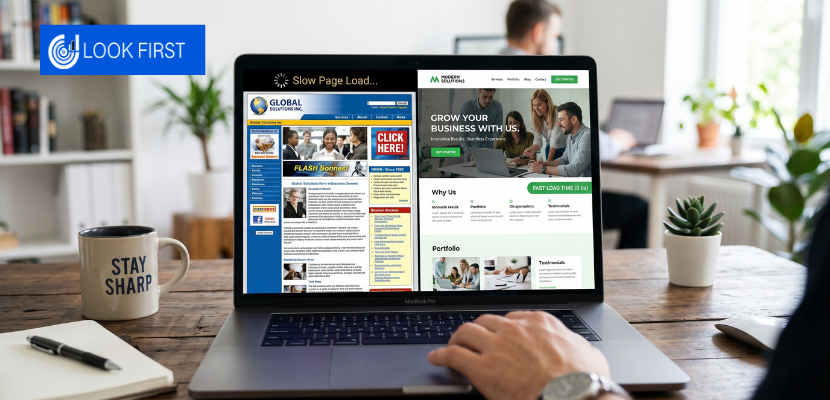
Your website is working right now, or it isn’t. There is no middle ground. Every day a business runs on a slow, poorly structured, or visually outdated website, it quietly loses enquiries, sales, and credibility to competitors whose websites do the job properly.
What Is Web Design, And Why Does It Matter for Business?
For businesses, web design is not a cosmetic exercise. It is a strategic one. A well-designed website does several things simultaneously: it communicates who you are and what you offer within seconds of a visitor landing on your site; it builds trust through visual credibility and professional presentation; it reduces friction at every stage of the customer journey; and it performs in search engines, attracting the right visitors in the first place.
A poorly designed website does the opposite: it creates doubt, confusion, and friction, and sends potential customers directly to your competitors.
Why Your Website Is Your Most Important Business Asset
Before getting into the specifics of how to design a website well, it is worth understanding why this investment matters as much as it does.
First impressions happen in milliseconds
Research consistently shows that visitors form an opinion about a website within the first few seconds of landing on it. That opinion, trustworthy or not, professional or not, relevant or not, influences everything that follows. You cannot recover a bad first impression with good content buried three scrolls down the page.
Your website works when you are not
Unlike a salesperson or a receptionist, your website is available every hour of every day. For many businesses, it is the first and most frequent point of contact a potential customer has with the brand. A website that performs well is effectively your most consistent and cost-efficient sales tool.
It directly influences your search engine rankings
Google’s ranking algorithms evaluate a wide range of signals that are inseparable from good web design, page speed, mobile usability, time on site, bounce rate, Core Web Vitals scores, and site architecture. A well-designed website is not just better for users; it is better for SEO.
It either builds or undermines trust
In most industries, a potential customer will visit your website before making contact. If the site looks outdated, loads slowly, or is difficult to navigate, they will question the quality of your service before they have spoken to anyone. Design is not vanity; it is credibility. For any digital marketing agency in London, this is one of the first things we assess when reviewing a business website
The Core Principles Of Effective Business Web Design
Great business web design is not about following trends or making something look impressive. It is about applying a set of proven principles that consistently produce high-performing websites.
1. User Experience (UX) First
User experience refers to how a visitor moves through your website, how easy it is to find information, how intuitive the navigation is, how clearly the content is organised, and how naturally the site guides them towards taking action.
Good UX starts with understanding your audience. Who are they? What are they looking for when they land on your site? What questions do they need answered before they feel confident enough to get in touch or make a purchase? Every structural and design decision should be built around the answers to those questions.
Key UX principles for business websites include clear, logical navigation that does not require visitors to think; a consistent visual hierarchy that guides the eye naturally down the page; short, purposeful copy that answers questions quickly; and calls to action placed where visitors are most likely to be ready to act.
Poor UX, confusing menus, cluttered layouts, walls of text, and buried contact information are some of the most common reasons websites fail to convert visitors into customers, regardless of how much traffic they receive.
2. Mobile-First Design
More than half of all web traffic now comes from mobile devices. Google evaluates mobile performance as a primary ranking signal. And yet a significant proportion of business websites still treat mobile as an afterthought, designing for desktop first and squeezing the result into a smaller screen.
Mobile-first design reverses this approach. The mobile experience is designed first, with the desktop version expanding from it rather than being compressed into it. The result is a website that works equally well across all screen sizes, smartphones, tablets, laptops, and desktops, without compromise on any of them.
Practically, this means readable font sizes without zooming, touch-friendly button sizes, fast loading on mobile networks, and content that prioritises the information mobile users are most likely to need first.
Mobile-first design reverses this approach. The mobile experience is designed first, for a deeper understanding of how this works in practice, read our guide to mobile-first web design.

3. Page Speed and Core Web Vitals
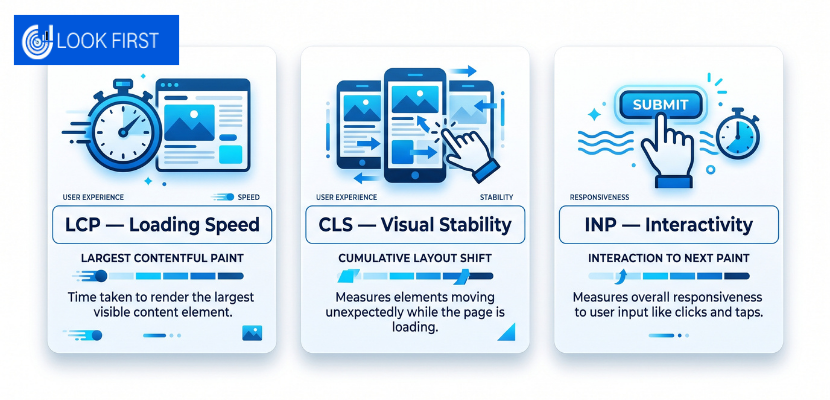
Speed is not a technical nice-to-have. It is a ranking, conversion, and trust factor all in one. Google’s Core Web Vitals, a set of performance metrics covering loading speed (Largest Contentful Paint), visual stability (Cumulative Layout Shift), and interactivity (Interaction to Next Paint), directly influence where your pages appear in search results.| Metric | What It Measures | Good Score | Poor Score |
|---|---|---|---|
| LCP (Largest Contentful Paint) | Loading speed | Under 2.5 seconds | Over 4 seconds |
| CLS (Cumulative Layout Shift) | Visual stability | Under 0.1 | Over 0.25 |
| INP (Interaction to Next Paint) | Interactivity | Under 200ms | Over 500ms |
4. Visual Hierarchy and Layout
Visual hierarchy is the art of arranging elements on a page so that visitors naturally process the most important information first. It is achieved through size, contrast, colour, whitespace, and positioning.On a well-designed business website, the visitor’s eye should move through a page in a deliberate sequence: from the headline that communicates the core value proposition, to the supporting content that builds confidence, to the call to action that prompts the next step. This journey should feel effortless; the visitor should never have to think about where to look next.Poor visual hierarchy, where everything is given equal prominence or the most important elements are lost in visual noise, produces confusion and inaction.5. Conversion-Focused Design
Every business website has a goal. For most, that goal is to generate enquiries, bookings, or sales. Conversion-focused design means that every element of the website, from the placement of a phone number to the wording of a button, is optimised to move visitors closer to that goal.This involves strategically placing calls to action at the moments in a visitor’s journey when they are most likely to act. It involves removing friction, unnecessary form fields, confusing navigation, and slow-loading pages, which creates hesitation. And it involves building trust progressively through the page, so that by the time a visitor reaches the call to action, they are confident enough to use it.Conversion rate optimisation is not a one-time task. It is an ongoing process of testing, measuring, and refining based on how real visitors actually behave on the site.6. SEO-Ready Architecture
A website that nobody finds cannot perform. SEO-ready architecture means building the site in a way that makes it easy for search engines to crawl, understand, and index every important page.This includes a logical URL structure, proper use of heading tags (H1, H2, H3) to convey page hierarchy, clean, efficient code, an XML sitemap, a properly configured robots.txt file, and internal linking that connects pages to distribute authority and aid navigation.It also means ensuring that every page has a clear, focused purpose by targeting a specific topic or keyword, rather than trying to cover too much ground on a single page. Search engines reward depth and clarity over breadth and ambiguity.Great business web design is not about following trends or making something look impressive. If you want to understand what makes a good website design, the answer is always rooted in these core principles.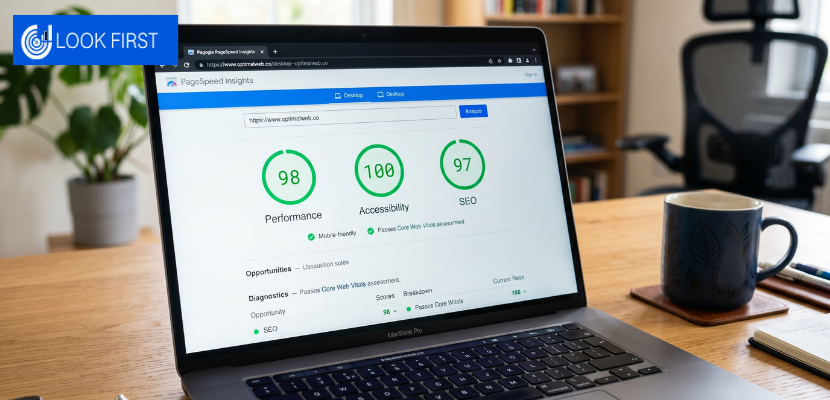
What Every Business Website Needs: The Essential Pages
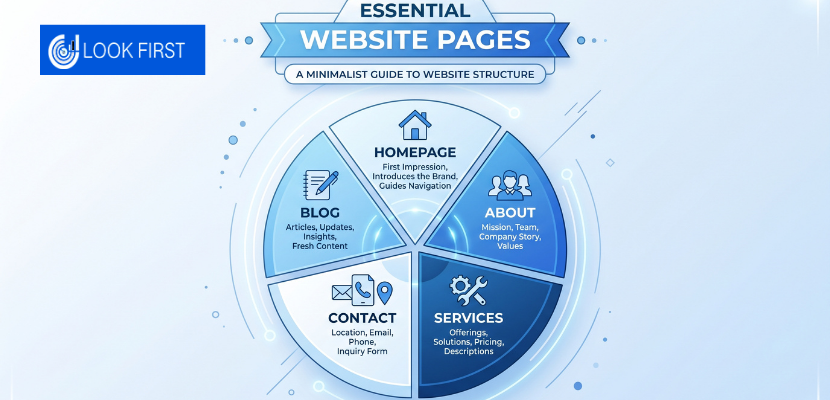
Regardless of industry or size, there are certain pages that every business website should include. Each one serves a specific purpose in the customer journey.
Homepage
The homepage is usually the first page a visitor sees and carries the highest traffic of any page on the site. Its job is to communicate clearly and quickly what the business does, who it serves, and why a visitor should stay. It should not try to do everything; it should orient the visitor and direct them to the pages most relevant to their needs.
A strong homepage includes a clear headline that communicates the core value proposition, a brief supporting statement that adds context, visual evidence of quality (imagery, portfolio samples, or social proof), and clear navigation to the key service or product pages.
About Page
Contrary to what many business owners assume, the About page is one of the most visited pages on most business websites. Visitors who are seriously considering working with a business want to know who is behind it. The About page is an opportunity to establish personality, build trust, and communicate the values and experience that differentiate the business from its competitors.
Service or Product Pages
These are the pages that do the heaviest lifting from an SEO and conversion perspective. Each service or product should have its own dedicated page, not a single page that lists everything. This allows each page to be optimised for a specific search term, provide sufficient depth of information to answer every question a prospective customer might have, and include calls to action relevant to that specific offering.
Contact Page
The contact page should be easy to find from every page on the site, and the contact process itself should involve as little friction as possible. A simple form, a phone number, an email address, and, where relevant, a physical address and a map. Do not make visitors search for a way to get in touch.
Blog or Resources Section
A regularly updated blog serves multiple purposes: it generates new indexed content that can rank for long-tail search terms, it demonstrates expertise and builds authority, and it gives visitors a reason to return to the site. For businesses investing in SEO, a well-structured content hub is one of the most valuable long-term assets a website can have.
Choosing the Right Platform for Your Business Website
The platform your website is built on will influence everything from how easy it is to manage day-to-day, to how well it performs in search engines, to how much it costs to maintain and develop over time.
WordPress
WordPress powers a significant proportion of the websites on the internet and remains the most widely used content management system for business websites. Its advantages are substantial: it is highly flexible, has an enormous ecosystem of plugins and integrations, gives full ownership and control over the site, and is well-suited to SEO when configured correctly.
The trade-off is that WordPress requires more technical knowledge to manage than some alternatives, and ongoing maintenance, updates, security, and backups need to be handled proactively.
Shopify
For e-commerce businesses, Shopify is one of the most capable and widely used platforms available. It handles the complexity of online selling, product management, payment processing, inventory, and shipping in a way that is relatively straightforward to manage without deep technical knowledge.
Custom-Built Websites
For businesses with specific functionality requirements that off-the-shelf platforms cannot accommodate, a fully custom-built website may be the right approach. Custom development offers complete control over every aspect of the site but typically involves a higher upfront cost and longer build timelines.
What to Avoid
Website builders that lock your content and data into a proprietary platform, charge escalating monthly fees, and offer limited SEO capability should be approached with caution. The short-term convenience often creates long-term constraints that are expensive and disruptive to resolve.

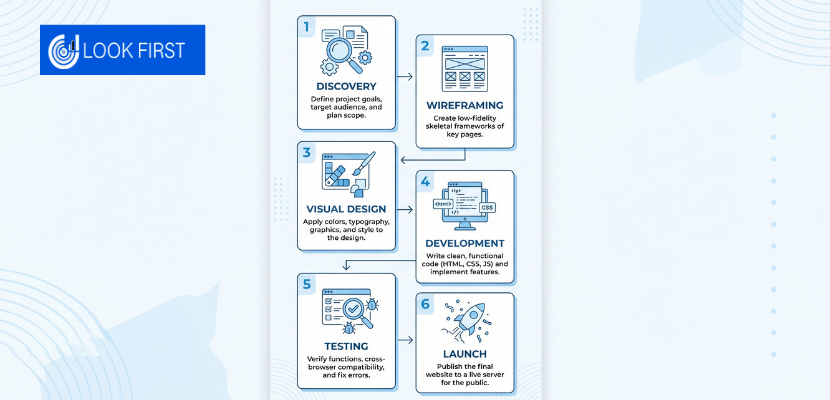
The Web Design Process: What to Expect
Understanding how a professional web design project works helps you prepare properly, ask the right questions, and get the best possible outcome. If you’re comparing agencies before committing, our guide on questions to ask a web design agency covers exactly what to check before you hire.
Discovery and Strategy
Every well-executed web design project begins with understanding. Before any design work starts, a professional agency will want to understand your business goals, your target audience, your competitors, and the specific outcomes you want the website to achieve. This phase informs every decision that follows.
Wireframing and UX Planning
Before visual design begins, the structure of the website is mapped out through wireframes, schematic layouts that show how content and elements will be arranged on each page, without visual styling. This stage ensures that the user journey and information architecture are right before investing time in the visual layer.
Visual Design
The visual design phase applies your brand identity, colours, typography, imagery, and graphic elements to the wireframe structure. This is where the website starts to look like itself. Good design at this stage is not decoration; it is the visual expression of the strategy established in the earlier phases.
Development
The approved design is built into a functioning website. This involves writing clean, efficient code, configuring the CMS, integrating any required third-party tools (analytics, CRM, email marketing platforms), and ensuring the site performs correctly across all devices and browsers.
Testing and Quality Assurance
Before launch, the site should be rigorously tested across devices, browsers, and screen sizes. Every link, form, and interactive element should be checked. Page speed should be measured and optimised. SEO fundamentals, meta tags, sitemap, robots.txt, and heading structure should be verified.
Launch and Handover
Going live involves domain configuration, hosting setup, and final checks. A professional agency will also submit the site to Google Search Console, set up analytics tracking, and provide a full handover so you understand how to manage and update the site going forward.
Web Design and SEO: Why They Cannot Be Separated
One of the most common mistakes businesses make is treating web design and SEO as separate projects, building the website first, then trying to optimise it for search engines afterward. This approach consistently produces suboptimal results.
The most effective approach is to build SEO considerations into the website from the very beginning. This means planning the site architecture around a clear keyword strategy, structuring each page with the correct heading hierarchy, ensuring technical performance meets Google’s standards from day one, and building internal linking into the page structure rather than retrofitting it later.
A website built with SEO in mind from the start will perform better in search, require fewer costly changes after launch, and provide a stronger foundation for content marketing that will build its authority over time.
How Much Does Web Design Cost for a Business?
Web design pricing varies significantly depending on the project scope, the chosen platform, the level of custom design and development required, and the agency or freelancer you work with.
As a general guide:
Template-based websites
Built on platforms like WordPress using a pre-built theme typically costs less but offers limited differentiation and often requires significant customisation to align with a brand properly.
Semi-custom websites
Use a framework or starter theme that is significantly customised to the client’s brand and requirements. This is the most common approach for small to medium businesses and offers a good balance of quality, flexibility, and cost.
Fully custom websites
These are designed and built from scratch with no template foundation. They offer the highest level of differentiation and functionality but come with higher cost and longer timelines.
Beyond the initial build, budget for ongoing costs including hosting, domain renewal, security maintenance, and periodic updates. A website is not a one-time investment; it requires ongoing attention to remain secure, performant, and effective.
Common Web Design Mistakes That Cost Businesses Money
Even well-intentioned web design projects can go wrong. These are the mistakes that most consistently undermine business website performance.
Prioritising looks over function
A visually impressive website that is slow to load, confusing to navigate, or unclear about what action visitors should take will not convert. Design serves function; function serves the business goal.Ignoring mobile users
A website that works beautifully on desktop but is difficult to use on a smartphone is failing more than half of its visitors before they can even engage.Weak or missing calls to action
Visitors will not take action unless they are clearly invited to. Every page should have a clear, relevant call to action that tells visitors exactly what to do next.No analytics tracking
Without data on how visitors are actually using the site, which pages they visit, where they drop off, and what they click on, there is no basis for improvement. Google Analytics and Search Console should be configured before launch, not as an afterthought.Choosing the wrong platform
Building on a platform that cannot scale with your business, locks you into rising monthly fees, or constrains your SEO, creates expensive problems further down the line.Treating the website as finished after launch
The best business websites get both right from the start, which is why choosing web design and development services in London that cover both disciplines under one roof makes such a significant difference. A website that is never touched after launch will gradually decline in both performance and relevance.| Common Mistake | Best Practice |
|---|---|
| Designing for desktop only | Mobile-first approach from day one |
| No clear calls to action | CTA on every page at the right moment |
| Slow page load times | Optimised images, caching, and fast hosting |
| No analytics setup | Google Analytics and Search Console before launch |
| Wrong platform choice | Platform selected around business goals and SEO |
| Website never updated after launch | Regular content updates and performance reviews |

Web Design Trends Worth Knowing In 2026
Design trends come and go, and chasing them for their own sake is rarely a good use of resources. But some trends reflect genuine improvements in user experience and technology that business websites should be aware of.
AI-powered personalisation is increasingly accessible, allowing websites to serve different content or calls to action based on visitor behaviour, location, or source.
Performance as a design standard, the expectation that websites load instantly and respond without delay, continues to rise. Visitors have less patience than ever for slow sites, and Google continues to weigh performance signals heavily in rankings.
Minimalism and clarity remain dominant in effective business web design. Clean layouts, generous whitespace, clear typography, and focused messaging consistently outperform visually complex designs in both usability and conversion.
Accessibility, designing websites that work for users with visual, auditory, or motor impairments, is both an ethical responsibility and an increasingly important ranking signal. Proper contrast ratios, alt text for images, keyboard navigability, and screen reader compatibility should be standard practice.
What A High-Performing Business Website Gets Right
Building a website that genuinely works for your business is not complicated, but it does require getting several things right simultaneously. The most consistently successful business websites share the same characteristics: a clear strategy built around audience and business goals; a mobile-first, fast-loading technical foundation; design that guides visitors naturally towards conversion; content that answers every question a prospective customer could have; and SEO that ensures the right people can find the site in the first place.
None of these elements works in isolation. A fast website with weak content will not convert. A beautifully designed website that nobody finds will not generate enquiries. A well-ranked website with confusing navigation will lose visitors before they take action.
Getting all of these right and maintaining them over time is what separates websites that work from those that simply exist.
Why Choose Look First Marketing
At Look First Marketing, we build websites that work, not just websites that look good. Every project we take on starts with a clear understanding of your business goals, your audience, and the outcomes you need the website to deliver. From there, everything, the design, the structure, the content, and the technical foundation, is built around those outcomes.
We are a results-driven digital marketing agency in London with experience across web design, SEO, and social media marketing. We do not hand you a template and call it done. We build custom, conversion-focused websites on a solid technical foundation, optimise them for search from day one, and stay on hand long after launch to make sure they keep performing.
If you are ready to build a website that genuinely works for your business, explore our custom web design services and WordPress development services, or get in touch for a free audit today.
Conclusion
Building a website that genuinely works for your business comes down to one thing: getting every element right at the same time. Strategy, design, speed, content, and SEO all have to work together. Compromise on any one of them, and the others cannot compensate.
The businesses that win online are not the ones with the biggest budgets. They are the ones whose websites are built with a clear purpose, maintained with intention, and continuously improved based on real performance data.
If your website is not generating the enquiries, bookings, or sales your business deserves, the problem is almost always fixable. But it requires an honest assessment of what is holding it back and a clear plan to address it.
FAQS
A semi-custom business website typically takes 6 to 12 weeks from kick-off to launch, assuming content and approvals are provided promptly. Larger or fully custom projects take longer.
Yes, but only the raw information. You’ll need to provide details about your business, services, and brand, while a professional agency handles the writing, editing, and structuring of that content into the finished site.
A custom website is designed specifically around your brand, audience, and business goals, whereas a template is built for everyone and optimised for no one in particular, resulting in a more distinctive and better-converting result.
Yes, provided it’s built on a suitable CMS with a proper handover. WordPress, for example, lets non-technical users update content and add blog posts without developer involvement.
Set up Google Analytics and Google Search Console before launch, then monitor organic traffic, conversion rate, bounce rate, and keyword rankings monthly, these metrics show whether the site is doing its job.