
The Complete Technical SEO Guide 2026: For Google & AI Search Engines
Quick Answer
Technical SEO is the process of optimising a website’s crawlability, speed, security, and structure so that search engines and AI systems can access, understand, and rank its content. In 2026, it also determines whether AI tools like ChatGPT and Google AI Overviews can cite your site, making it essential for both traditional rankings and AI search visibility.
A few years ago, technical SEO had one job. Make sure Googlebot could crawl your site, index your pages, and rank them above your competitors. That job hasn’t gone away. But it’s got company.
Search now includes Google’s AI Overviews, ChatGPT, Perplexity and Gemini, all of which pull answers directly from websites and present them to users without a click. If your site is hard to crawl, slow to load, or built in a way that hides your content from machines, you’re not just losing rankings. You’re becoming invisible to an entire second layer of search.
This is one piece of the bigger picture too. If you want the full picture beyond just the technical side, our complete SEO guide covers the strategy end-to-end.
This Technical SEO Guide walks through what technical SEO actually means in 2026, why it now matters for both traditional search and AI search, and exactly what to check on your own site. Whether you’re a small business owner trying to understand what your agency providing technical seo services is doing, or a marketer running your own audit, you’ll come away with a practical checklist you can actually use.
We work on technical SEO for trade and local service businesses every week at Look First Marketing, so a lot of what’s below comes from fixes we’ve made on real client sites, not just theory.
What Is Technical SEO?

Put simply, it’s everything happening behind the scenes of your website that determines whether a search engine can even find, load and make sense of your pages in the first place.
It’s different from content SEO, which is about what you say, and link building, which is about who vouches for you. Technical SEO is about how your site works underneath the surface, things a visitor never notices, but a search engine cares about deeply.
Technical SEO vs On-Page SEO vs Off-Page SEO
People mix these three up constantly, so it’s worth being precise.
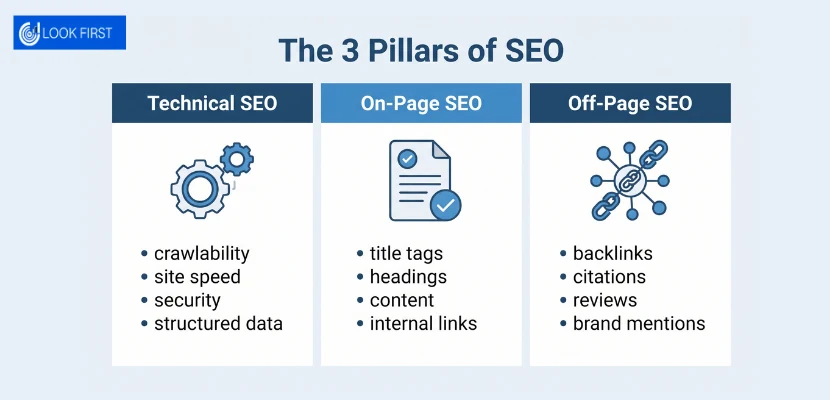
- Technical SEO covers crawlability, indexability, site speed, security, structured data and site architecture.
- On-page SEO covers title tags, headings, body content, keyword usage and internal links within a page.
- Off-page SEO covers backlinks, citations, reviews and anything that builds authority from outside your own website.
For a fuller breakdown of how these fit together, our guide to the different types of SEO goes into each one in more depth.
They overlap, but they’re not the same job. A page can have brilliant content and still fail to rank if the technical foundation underneath it is broken. If you’re weighing up which parts of your strategy need the most attention, our seo services in london cover all three areas together.
Why Technical SEO Is the Foundation Everything Else Depends On
Think of your website like a shop. Content is the products on the shelves. Off-page SEO is your reputation around town. Technical SEO is whether the front door actually opens.
If a search engine can’t crawl your pages, none of your carefully written content matters. We’ve seen roofing and paving sites with excellent service pages sitting completely unindexed because a robots.txt file was blocking the whole site by mistake. No amount of content fixes that on its own.
Why Technical SEO Matters More In The Age Of AI Search
This is the part that’s changed fastest. Google is no longer the only system reading your website. If you’re still getting your head around how these different approaches relate, our comparison of GEO vs SEO vs AEO breaks down where each one fits.
How Google AI Overviews Use Your Site’s Technical Signals
AI Overviews pull content from pages Google has already crawled, rendered and understood well enough to trust. If your page loads slowly, has messy HTML, or buries key information inside JavaScript that doesn’t render properly, Google’s systems may simply skip it in favour of a competitor’s cleaner page.
Clear structure, fast load times and accurate metadata all increase the odds that your content gets picked up.
How ChatGPT, Perplexity and Gemini Crawl and Cite Websites
Answer engines like these work differently to Googlebot, but the underlying requirement is similar. They need to reach your content, parse it, and be confident about what it means.
Pages with clean HTML, sensible heading structure and explicit facts (prices, locations, services, dates) tend to get cited more often than pages that rely on vague marketing copy or content hidden behind interactive elements.
The Risk of JavaScript-Heavy Sites Being Invisible to Answer Engines
Many modern websites render key content, prices, availability, and contact details using JavaScript that runs in the browser. Googlebot can usually handle this, though it takes extra processing time.
AI crawlers are often less patient. Some don’t execute JavaScript at all, which means anything rendered client-side simply isn’t there as far as they’re concerned. If your core information depends on JavaScript to appear, you could be handing your competitors free visibility in AI search results.
The Complete Technical SEO Checklist For 2026
Here’s the practical part. Work through this in order, since earlier items tend to block progress on later ones.
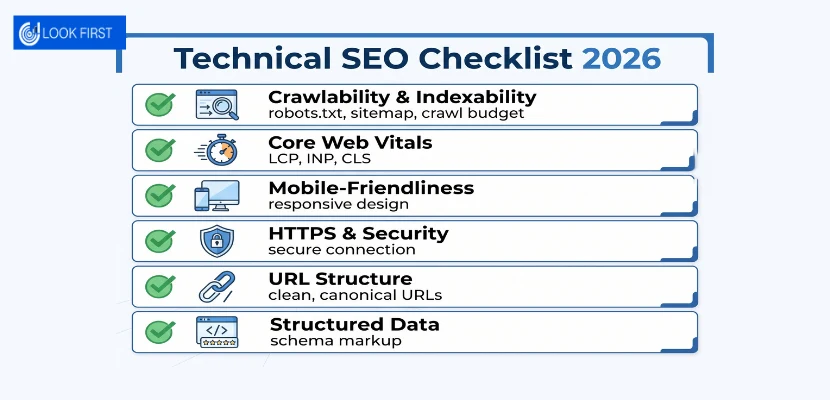
Crawlability & Indexability
Before anything else, confirm search engines can actually reach and index your pages.
- Check your robots.txt file isn’t accidentally blocking important sections of the site. Google’s own robots.txt guide is worth a quick read if you’ve never checked yours before
- Submit an up-to-date XML sitemap through Google Search Console
- Use the URL Inspection tool to confirm key pages are indexed
- Watch your crawl budget on larger sites, since wasted crawls on low-value pages can delay indexing of new content
Core Web Vitals & Site Speed
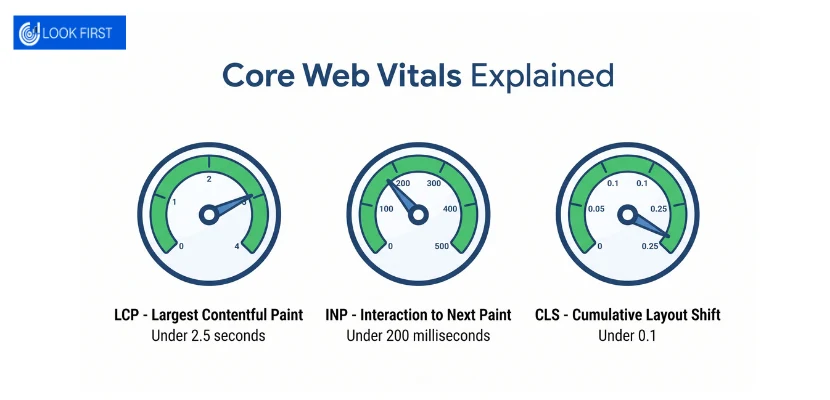
Google measures three specific speed and stability metrics under Core Web Vitals:
- Largest Contentful Paint (LCP), ideally under 2.5 seconds
- Interaction to Next Paint (INP), ideally under 200 milliseconds
- Cumulative Layout Shift (CLS), ideally under 0.1
A slow site doesn’t just frustrate visitors. It signals lower quality to both Google and AI crawlers that are weighing up which pages to trust. Compressing images, removing unused code and choosing decent hosting solve most speed problems without needing a full rebuild.
Mobile-Friendliness
Google indexes the mobile version of your site by default. If your mobile layout is broken, cramped, or missing content that appears on desktop, that’s what gets evaluated.
Test your key pages on an actual phone, not just by resizing in a browser. Small issues like overlapping buttons or text that’s too small to read are easy to miss on a desktop monitor.
HTTPS & Site Security
HTTPS has been a baseline requirement for years now. If your site still runs on HTTP or has mixed-content warnings from old HTTP resources loading on secure pages, fix that first. It’s a quick win.
URL Structure & Canonicalisation
Clean, descriptive URLs help both users and machines understand a page before they’ve even clicked. Compare these two:
- /services/technical-seo
- /page?id=4471&cat=9
The first tells you exactly what the page is about. The second tells you nothing.
Canonical tags matter here too. If you have several URLs showing similar content, a canonical tag tells search engines which version to index, preventing your own pages from competing against each other.
Fixing Duplicate Content Issues
Duplicate content usually isn’t intentional. It creeps in through things like:
- www and non-www versions of the site both being live
- HTTP and HTTPS versions both being accessible
- Printer-friendly or filtered versions of pages with no canonical tag
- Content copied across multiple location pages with only the town name changed
That last one is worth flagging specifically, because we see it constantly on multi-location service business sites. Swapping out a place name isn’t enough to make two pages genuinely different in Google’s eyes.
Structured Data & Schema Markup For AI Visibility
Schema markup is code added to your pages that explicitly tells search engines and AI systems what your content actually is, rather than leaving them to infer it from surrounding text. It’s built on the shared vocabulary maintained at Schema.org, which Google, Microsoft and other major search providers all support.
The Schema Types That Matter Most in 2026
- Article / BlogPosting, for blog content, including author and publish date
- LocalBusiness, for service area, opening hours and contact details
- Product, for anything you sell with price and availability
- FAQPage, for question and answer content
- HowTo, for step-by-step instructional content
Why FAQ Schema Rules Changed in Late 2025
Google narrowed which sites are eligible for FAQ rich results in the search results page itself towards the end of 2025, restricting the visual snippet to a smaller set of authoritative sites.
That doesn’t mean FAQ schema is pointless now. It’s still genuinely useful for helping AI answer engines understand and accurately quote your Q&A content, even if you no longer see the expanded FAQ dropdown directly in Google’s results.
Schema as an Entity Strategy, Not Just Rich Snippets
Most sites that use schema at all treat it as decoration, a way to get a star rating showing in search results. That’s a narrow way to think about it.
Schema is really about defining your business as a clear, verifiable entity. Consistent LocalBusiness markup across every page, matching your name, address and phone number exactly, helps search engines and AI systems build confidence in who you are and where you operate. That confidence is what gets you cited.
Internal Linking & Site Architecture
Building a Crawlable Site Structure
A good site structure means every important page is reachable within a few clicks from your homepage. Deeply buried pages, five or six clicks deep, get crawled less often and rank less well.
A flat structure with clear categories works better than a maze of subfolders.
Internal Linking Best Practices for Authority Flow
Link between related pages using descriptive anchor text rather than generic phrases like “click here”. If you’ve written a guide on paving maintenance, link it naturally from your paving service page, and vice versa.
This does two things. It helps search engines understand which pages are related, and it spreads authority from your strongest pages to newer ones that need a boost.
Technical SEO For Small Businesses
Larger sites have larger budgets and dedicated developers. Small business sites tend to run into a specific, repeatable set of problems instead. Many of these overlap with what we cover in our guide to local SEO, since technical fixes and local visibility go hand in hand.
NAP Consistency Across Location Pages
NAP stands for name, address and phone number. If these details differ even slightly between your website, Google Business Profile and directory listings, it undermines the trust signals that local rankings depend on.
We’ve corrected this exact issue on several client sites where an old address or outdated phone number was still live on a handful of pages, quietly undermining every other bit of SEO effort.
JavaScript Widgets That Silently Break Indexing
Counters, testimonial sliders, and review widgets built entirely in JavaScript can look fine to a human visitor while being invisible to a crawler that doesn’t fully render the page. If your star rating, review count or key trust signals only exist inside one of these widgets, a search engine or AI crawler may never see them at all.
Common Technical SEO Mistakes That Hurt Rankings
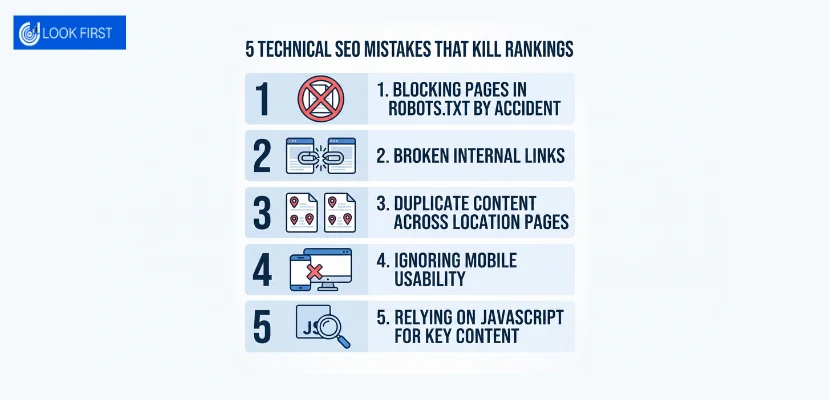
- Blocking important pages in robots.txt by accident
- Leaving broken internal links pointing to deleted or renamed pages
- Duplicating content across near-identical location pages
- Ignoring mobile usability in favour of a polished desktop design
- Skipping HTTPS or leaving mixed content warnings unresolved
- Relying on JavaScript to render core information like prices or contact details
- Never checking Google Search Console for crawl errors
How Often Should You Audit Your Site?
| Site Size | Recommended Audit Frequency |
|---|---|
| Small business site (under 50 pages) | Every 3 months |
| Growing site with regular content updates | Monthly |
| Large or e-commerce site | Monthly, with continuous monitoring |
| After a redesign or migration | Immediately, then again 2–4 weeks later |
Beyond scheduled audits, keep an eye on Google Search Console between checks. A sudden drop in indexed pages or a spike in crawl errors usually means something broke and needs attention sooner rather than later.
Tools worth having in your corner include Google Search Console, PageSpeed Insights, and a crawler such as Screaming Frog for spotting broken links, duplicate titles and missing metadata across the whole site at once.
Conclusion
Technical SEO used to be a single question. Can Google crawl and rank this page?
In 2026, it’s really two questions. Can Google crawl and rank this page, and can an AI system confidently read and cite it? The good news is that fixing one largely fixes the other. Clean structure, fast loading, honest HTML and clear structured data serve both audiences at once.
Most small-business sites we review have at least a handful of the issues covered in this guide, often without the owner realising it. That’s not a criticism. Technical SEO isn’t something you stumble into by accident; it takes a proper audit to surface.
Not sure whether your own site has technical SEO issues holding it back? Get a free Technical SEO audit from Look First Marketing and find out exactly what’s costing you visibility on Google and in AI search.
FAQS
Technical SEO is the practice of optimising a website’s infrastructure, including crawlability, site speed, mobile-friendliness, security and structured data, so that search engines and AI systems can access, understand and rank its content correctly.
Technical SEO covers the backend of a site, crawlability, speed and structure. On-page SEO covers the content itself, including headings, keywords and body copy. Both work together, but they solve different problems.
Common examples include fixing robots.txt errors, improving Core Web Vitals scores, adding structured data, resolving duplicate content, ensuring HTTPS is configured correctly, and ensuring key content doesn’t rely solely on JavaScript to appear.
Start with Google Search Console to check indexing and crawl errors, then review Core Web Vitals, mobile usability, structured data, and duplicate content. A crawler tool can speed this up by scanning your whole site for issues at once.
Yes, arguably more than before. AI search engines like ChatGPT and Google AI Overviews need clean, crawlable, well-structured pages to understand and cite your content, so technical issues now affect visibility across two search ecosystems rather than one.
Small-business sites should be audited roughly every three months. Larger or frequently updated sites benefit from monthly checks, and any site should be re-audited shortly after a redesign, migration, or major content update.
Schema markup is structured code added to a webpage that explicitly tells search engines and AI systems what the content represents, such as a business, product or article. It helps build the entity confidence that both traditional rankings and AI citations depend on.