
Why Has My Website Traffic Dropped? 9 Reasons (2026 Guide)
If you’re asking why has my website traffic dropped, it’s almost certainly one of nine reasons. The most common are a tracking change, normal seasonal movement, or a Google update,
not AI. AI Overviews are a genuine cause, but they mainly affect informational content, not local or transactional pages. Start by checking whether you’ve actually lost visitors or just lost the ability to count them. That takes ten minutes and rules out the most common cause of all. Then work through the list below in order.
Before You Panic: Four Checks In Ten Minutes
- Compare year on year, not month on month: August against July tells you nothing useful. August 2026 against August 2025 does.
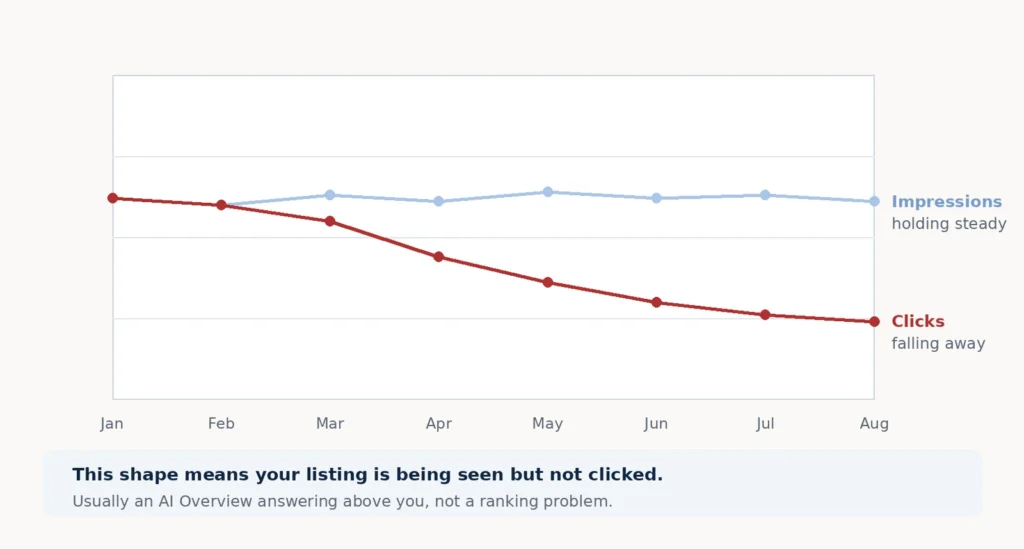
- Check Google Search Console impressions: If impressions held steady but clicks fell, that’s a click-through problem, not a ranking problem. Very different fix.
- Check the Google Search Status Dashboard: It lists every confirmed update with exact dates. Line your drop-off against them.
- Check that your tracking still works: More on this below, because it’s the single most common cause.
If you’ve done all four, you can already rule out about half the list.
Match Your Symptoms To The Cause
| What you’re seeing | Most likely cause | Where to check |
|---|---|---|
| Clicks fell, impressions held steady | AI Overview or SERP layout change | Search Console performance report |
| GA4 fell but Search Console didn’t | Tracking problem, not a traffic problem | Compare both over the same dates |
| Sharp cliff on one specific date | Technical fault or a Google update | Search Console Pages report, then the update dates |
| Drop lines up with a confirmed update | Core or spam update | Google Search Status Dashboard |
| Same dip happened this time last year | Seasonal | Year-on-year comparison |
| Slow decline across several months | Stale content or competitors improving | Page-level comparison in Search Console |
| Traffic fell but enquiries didn’t | You lost low-intent visitors | Your own enquiry records |
Find your row, then read the matching section below.
9 Reasons Why Has My Website Traffic Dropped?
1. Your tracking changed, not your traffic
This is the most common and most overlooked cause.
Cookie consent banners, GA4 configuration changes, a new filter, a plugin update, a missing tag on a redesigned page, any of these can make traffic look like it collapsed when nothing actually happened.
How to check:
Compare Search Console clicks with GA4 sessions over the same period. Search Console doesn’t rely on your site’s tracking code. If Search Console looks normal and GA4 doesn’t, the problem is your analytics, not your visitors.
2. It’s seasonal, and you’re comparing the wrong months
Almost every business has a rhythm. Trades go quiet over Christmas. Accountants spike before January. Retail dies in February.
If you’re comparing this month to last month, you’ll see drops that mean nothing.
How to check:
Compare the same month last year and the year before. If the shape matches, you have a season, not a problem.
3. A Google core update
2026 has been an unusually heavy year for updates.
The March 2026 core update was the most volatile on record: 79.5% of top-3 results changed position, and nearly one in four top-10 pages fell out of the top 100 entirely. The May 2026 core update, which ran from 21 May to 2 June, hit harder still. There were also spam updates in March, June and August.
Worth knowing: core updates aren’t penalties. They’re a re-scoring of everything. And they don’t only produce losers; industry reporting after the spring updates found roughly a third of sites declined, a third gained and a third held flat.
How to check:
The Google Search Status Dashboard lists confirmed updates with exact start and end dates, going back five years. You can also subscribe to be notified when a new one rolls out. A drop starting 24 March points to the spam update; from 27 March onward, it points to the core update. If your drop doesn’t line up with any confirmed date, it wasn’t an update.
Google’s own guidance on core updates is worth reading before you change anything. Two things in it matter most. First, wait a full week after an update finishes before analysing Search Console, then compare that week against the week before the rollout started; otherwise, you’re reading noise. Second, scale your response to the size of the drop: falling from position 2 to 4 needs no drastic action, but falling from 4 to 29 warrants a proper look.
Be careful here. Heavy volatility in early August 2026 led many people to blame a core update. Google never confirmed one. Chasing a phantom update wastes weeks.
The fix:
There’s no quick one. Core update recovery usually comes with the next core update, and it’s driven by genuine content quality and first-hand expertise. Our E-E-A-T guide covers what Google is actually measuring.
4. Something broke technically
Less common, but when it happens, the drop is sharp and immediate rather than gradual.
The usual suspects: a noindex tag left on after a redesign, a robots.txt blocking crawlers, broken redirects after a site migration, an expired SSL certificate, or pages that got slow enough to fail Core Web Vitals.
How to check:
Search Console → Pages report. Compare what’s indexed with what isn’t, and check the exclusion reasons. A sudden cliff on a specific date usually means something technical.
Our complete technical SEO guide covers how to find and fix each of these.
5. Your competitors got better
Rankings are relative. You can do nothing wrong and still drop, because someone else did something right.
How to check:
Search your main keywords and look at who’s above you now who wasn’t before. Read their page. Usually you’ll find it’s longer, more specific, more recently updated, or answers questions yours doesn’t.
6. Your content went stale
A page written in 2023 with 2023 statistics gradually loses to pages with 2026 ones. Nothing dramatic happens; it just slides.
How to check:
Sort your pages by traffic change in Search Console. Look at your biggest losers and check when you last meaningfully updated them. Not the date stamp, the actual content.
The fix:
Refreshing existing pages usually beats writing new ones. Update the figures, add what’s changed, and remove what’s no longer true.
7. You lost backlinks
Sites go offline, articles get deleted, directories close. Links you earned years ago quietly disappear.
How to check:
Any backlink tool will show lost referring domains over time. A sharp drop in links to a specific page often explains a drop in that page’s rankings.
8. The search results page changed shape
Even without AI, Google keeps giving more space to things that aren’t your listing. Ads, the map pack, shopping results, video carousels, and “people also ask” boxes each push organic listings further down.
Your position can stay identical while your actual visibility falls.
How to check:
Search your main keyword on mobile and count how far you have to scroll to reach your listing. Then compare that to what your Search Console CTR used to be at that position.
9. AI Overviews and zero-click search
Here’s why this is ninth rather than first.
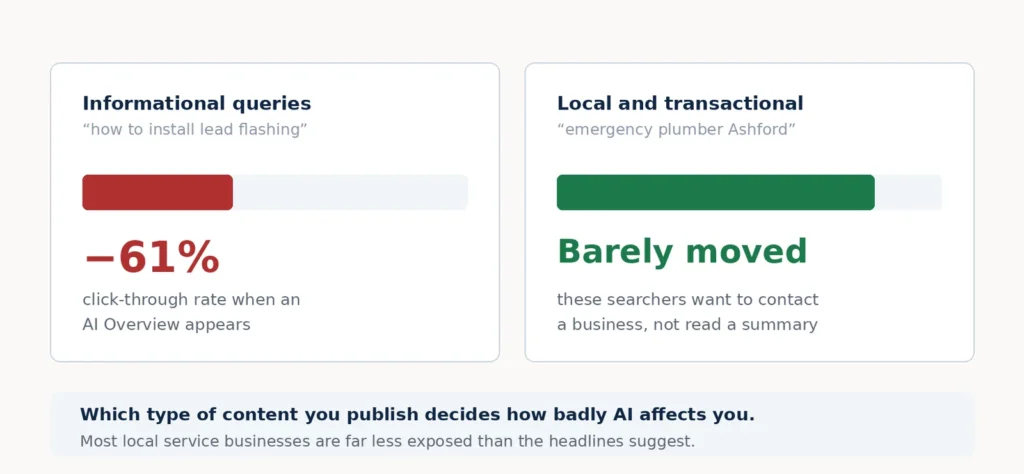
The data is real. Around 68% of US Google searches now end without a click, up from 60% in 2024, and that rises to roughly 83% when an AI Overview appears. Large-scale industry analysis covering more than five million queries found organic click-through rates fall by around 61% on queries where an AI Overview is shown. Current projections put organic search traffic down 25% by 2026 and 50% by 2028.
But the effect is uneven. Informational queries like “what is” and “how to” are hit hardest. Transactional and local queries are far less affected, because someone searching “emergency plumber Ashford” wants to phone a plumber, not read a summary.
So if you run a local service business, AI Overviews are probably not your main problem. If you publish guides and how-to content, they very likely are.
How to check:
In Search Console, filter to your informational pages. If impressions are flat or rising while clicks fall, AI is answering the query and your page is feeding the answer.
The fix isn’t to stop publishing. It’s to become the source AI cites. Our guides to what GEO is and the difference between GEO, SEO and AEO explain how that works in practice.
One thing worth knowing: ranking in the top ten no longer guarantees you’ll be cited. The overlap between top-10 rankings and AI Overview citations has fallen sharply since mid-2025. They’re now two separate problems.
What To Do First When Traffic Drops
In order:
- Rule out tracking. Compare Search Console against GA4.
- Rule out seasonality. Compare year on year.
- Check the dates. Does your drop line up with a confirmed Google update?
- Check indexing. Search Console Pages report.
- Split informational from commercial. They have different causes and different fixes.
- Then decide. Only now do you know what you’re actually fixing.
Most people skip straight to step six, change ten things at once, and then can’t tell what worked.
When A Website Traffic Drop Doesn't Matter
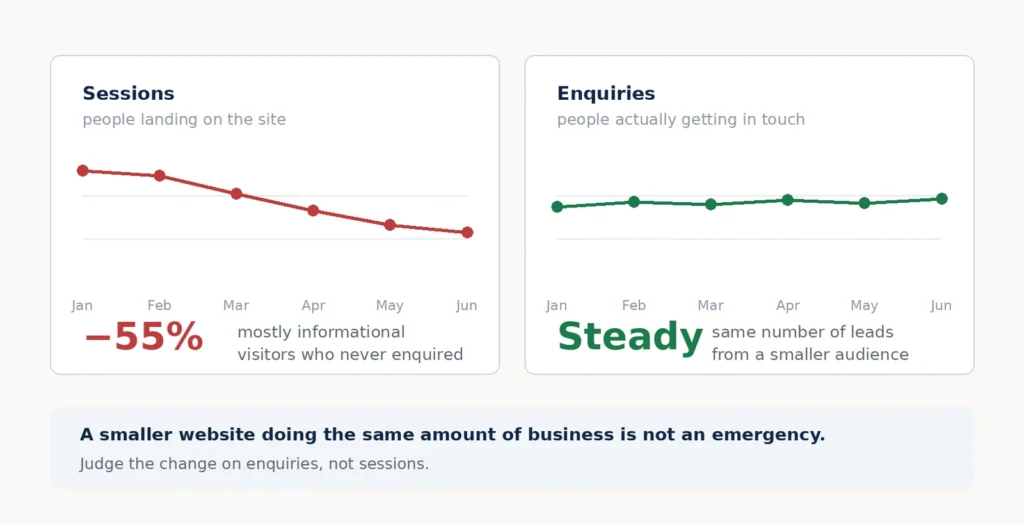
Not every decline is a problem. If you lost traffic to informational pages but enquiries held steady, you lost visitors who never would have bought. That’s a smaller website doing the same amount of business.
AI-referred traffic converts significantly better than standard organic, because people arrive already informed. Fewer visitors, better visitors.
The metric that matters is enquiries, not sessions. If sessions fell and enquiries didn’t, you don’t have an emergency. You have a reporting habit that needs updating.
Getting Help With This
Look First Marketing is a digital marketing agency in London that diagnoses exactly this. Not guesswork: we line your data up against confirmed update dates, check your tracking, separate informational from commercial pages, and tell you what actually happened.
If your traffic has dropped and you’re not sure why, send us your Search Console access and we’ll tell you which of these nine it is.
Frequently Asked Questions
Because your listing is being seen but not clicked, this usually means an AI Overview is answering the query above you, or the results page has added ads, a map pack or other features that push your listing down. Check impressions against clicks in Search Console; if impressions held and clicks fell, it’s a click-through problem.
Check the Google Search Status Dashboard, which lists every confirmed update with exact start and end dates. Line your traffic chart up against those dates. If your drop doesn’t match a confirmed update, it wasn’t one, despite what forums may say.
Usually months, and recovery often arrives with the next core update rather than immediately. Google runs core updates roughly every three to four months. There is no quick fix, and reactive changes made in a panic frequently make things worse.
For informational content, yes, organic CTR drops around 61% when an AI Overview appears. For local and transactional queries, it matters far less, because those searchers want to contact a business rather than read an answer. Which type of content you publish determines how badly you’re affected.
No. Content is how AI tools learn what your business does and who to recommend. The change is what good content looks like: clear, factual, well-structured and genuinely expert, so it gets cited rather than ignored.
Probably not. You most likely lost low-intent informational visitors while keeping the ones who were going to buy. Track enquiries and enquiry quality rather than sessions, and judge the change on that.